Important info
Backups/syncing locations/trails
More ..
WA soil & drillhole assay data
App features and screenshots
- Ideal app for prospectors, fossickers, geologists, earth science students & educators
- Runs on Android and Apple phones and tablets
- Maps are downloaded to your phone so there is no dependancy on mobile reception in the field
- Maps covering all of Australia & New Zealand
- Trails and marked locations are private
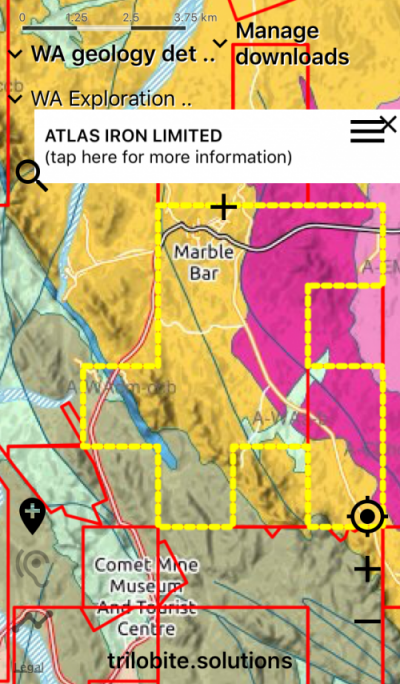
- Simplified and detailed geology maps for all of Australia
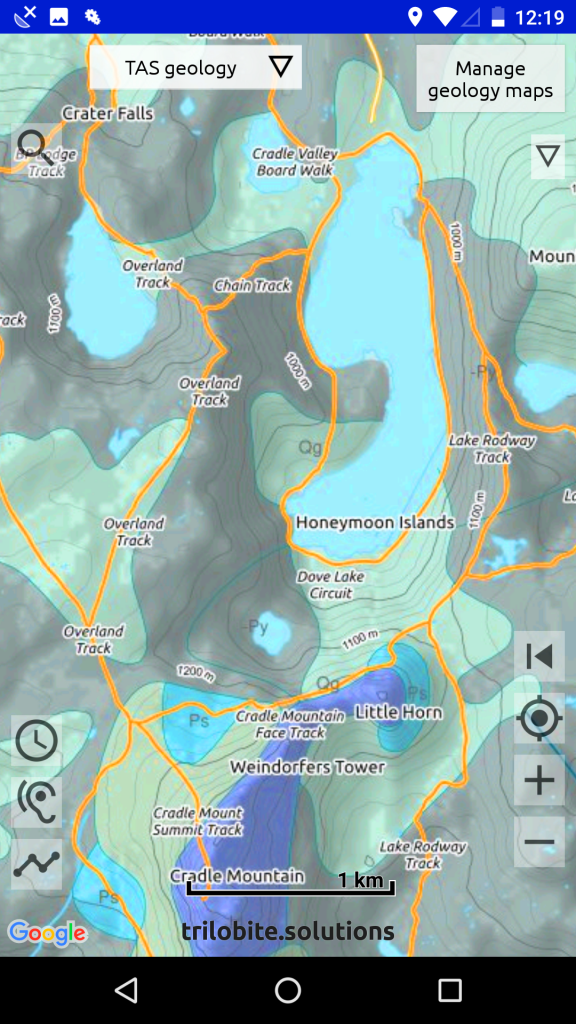
- Terrain is shown on the geology maps, so make more sense to non-geologists
- Old mine workings, gold, gem and other metal finds
- Gold distribution maps
- Mining & exploration tenement information
- Interactive – tap on maps to display detailed geology and resource information
- Spoken geology – the app tells you when the geology changes as you drive – use this with the simple geology maps
- Data is sourced from the state/provincial geological surveys and Geoscience Australia
- Aero-magnetic imagery for all states/provinces
- Bush-walking tracks shown with contours
- Record your trail, so you can retrace your steps (data is totally private)
- Record notes on important locations
– choose a colour for each marker (data is totally private) - Export your field data to Google Earth or your GIS system
- Import trails and locations created in Google Earth
- Import data layers as geojson
Maximise battery life
When you are in the field with little or no reception, we suggest that you put your phone into flight mode. Then your phone won’t be continually trying and failing to get mobile reception, which uses up your battery.
Acknowledgements
Thanks to the government organisations – Australian and New Zealand – that provide their data as Open data. And gratitude to the generations of dedicated field geologists that have walked, ridden and driven over the remotest parts of our continents collecting data that forms the basis of our knowledge of the evolution of our continents.
Warning about iPads without SIM slots
The WIFI-only iPad does not have GPS hardware, so cannot determine your location in the field. An iPad with a SIM slot is required for GPS functionality in the field. (But you do NOT need to have a SIM inserted.) See #4 in trouble-shooting for a get-around.